Ryoko Portable Wifi – Real Experiences & Complete Product Overview
✅Special Discount Today✅
https://fitcarenow.com/ryoko-wifi-buy
Ryoko Portable Wifi: A Complete Guide, Features, Benefits, Reviews & Buying Information
Staying connected while traveling, working remotely, or spending time away from traditional broadband can be challenging. Ryoko Portable Wifi is designed to provide a convenient way to access the internet through a compact mobile hotspot. Instead of depending on hotel Wi-Fi, cafés, or public networks, users can create their own private Wi-Fi connection and connect compatible devices.
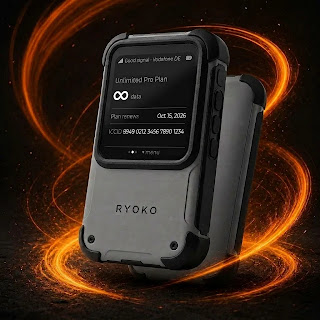
Ryoko is described by its official materials as a portable cellular Wi-Fi hotspot that can connect multiple devices at the same time. Depending on the model and service plan, specifications and coverage can vary, so buyers should check the exact product and data package before purchasing.
✅Tap Here to Get Your Bottle at the Best Price Online!✅
What Are Ryoko Portable Wifi?
Ryoko Portable Wifi is a pocket-sized wireless hotspot designed to provide internet access through a mobile network. Rather than requiring a fixed broadband connection, the device uses cellular connectivity and then shares that connection through Wi-Fi.
This makes Ryoko particularly useful for travelers, remote workers, students, families, and people who regularly move between locations. The device can connect smartphones, laptops, tablets, smartwatches, and other Wi-Fi-enabled electronics. Official information states that up to 10 devices can be connected simultaneously.
One important point is that Ryoko is not free or satellite internet. Internet access depends on cellular coverage and an active data service. The exact SIM and service requirements also depend on the Ryoko model being purchased.
How Do Ryoko Portable Wifi Work?
Ryoko Portable Wifi works similarly to a mobile hotspot. The device connects to a supported cellular network and converts the mobile data connection into a private Wi-Fi network.
After switching the device on, users can connect their phone, computer, tablet, or other Wi-Fi-enabled device. The current Ryoko user guide explains that users can connect either by scanning the displayed QR code or by manually entering the Wi-Fi name and password.
Once connected, several devices can share the same internet connection. Network performance will depend on factors such as cellular signal strength, location, network congestion, data plan, and the specific Ryoko model.
Key Ingredients
Because Ryoko Portable Wifi is an electronic device rather than a consumable product, it does not contain “ingredients” in the traditional sense. Instead, its important components and features include:
- Portable Wi-Fi hotspot hardware
- Cellular connectivity
- SIM or integrated connectivity technology, depending on model
- Rechargeable battery
- Wi-Fi broadcasting capability
- Display and connection controls
- USB-C charging on current models
The official Ryoko site describes its current hotspot as supporting up to 10 devices, USB-C charging, portable operation, and battery-powered use.
Potential Benefits
Portable Internet Access
One of the biggest advantages of Ryoko Portable Wifi is portability. Users can carry the device in a pocket, backpack, or travel bag and use it wherever supported cellular service is available.
Connect Multiple Devices
Instead of purchasing separate mobile data plans for every device, users can connect several Wi-Fi-enabled products to one hotspot. Ryoko states that up to 10 devices can connect simultaneously.
Useful for Travel
Travelers may appreciate having a dedicated connection rather than repeatedly joining hotel, airport, or café networks. This can be especially convenient when working remotely or traveling with multiple devices.
Private Wi-Fi Connection
Ryoko creates a dedicated wireless network rather than requiring users to rely on an open public hotspot. This can offer a more controlled connection environment when handling everyday online activities.
Easy Setup
The setup process is designed to be straightforward. The official guide explains that users can power on the device and connect through a QR code or the displayed Wi-Fi credentials.
Battery-Powered Convenience
Because Ryoko includes a rechargeable battery, it can operate without being permanently connected to a wall outlet. Battery performance naturally depends on usage and the particular model.
✅Tap Here to Get Your Bottle at the Best Price Online!✅
How To Use Ryoko Portable Wifi
Using Ryoko Portable Wifi generally involves a few simple steps:
Step 1: Charge the device using the supplied USB-C cable if necessary.
Step 2: Press and hold the power button until the device starts.
Step 3: Check the device screen for the Wi-Fi information or QR code.
Step 4: Scan the QR code with your phone or manually select the Ryoko Wi-Fi network.
Step 5: Enter the displayed password if required.
Step 6: Connect additional Wi-Fi-enabled devices as needed.
The official user guide confirms that smartphones, laptops, and other compatible devices can be connected, with up to 10 devices supported simultaneously.
Before traveling, it is also sensible to verify that your data service is active and that your destination has compatible cellular coverage.
Customer Reviews
Customer experiences with Ryoko can vary because performance depends on location, cellular networks, data plans, and the particular model. Some users may value the convenience of carrying one dedicated hotspot for several devices, while others may be more concerned about data costs or coverage limitations.
Independent reviews generally describe Ryoko as a genuine portable cellular hotspot but emphasize that buyers should distinguish the hardware from the accompanying data service.
Therefore, prospective customers should consider reviews alongside the exact model, coverage area, data allowance, renewal conditions, and return policy rather than relying solely on promotional claims.
Side Effects
Ryoko Portable Wifi does not have “side effects” in the same sense as a food, cosmetic, or health product. However, there are practical considerations.
The device requires charging, and battery life can decrease depending on usage. Internet performance can also vary when cellular signals are weak or networks are congested.
Users should also keep their Wi-Fi password private and follow the manufacturer's instructions for charging and operating the device. Ryoko's terms specifically note that the device contains a lithium battery and requires periodic charging.
Pricing & Where To Buy
Ryoko pricing can vary according to the model, promotions, location, and included data service. The official Ryoko website currently promotes its portable hotspot and different features, while data allowances and service arrangements should be checked carefully at checkout.
Potential buyers should verify:
- Exact Ryoko model
- Current device price
- Included data allowance
- Data-plan renewal costs
- Supported countries
- Return and refund terms
- SIM requirements
- Shipping details
Checking these details before ordering can help prevent unexpected service costs.
Frequently Asked Questions
Is Ryoko Portable Wifi free?
No. The device itself does not create free internet. It requires an appropriate cellular data service or plan.
How many devices can connect to Ryoko?
According to Ryoko's official information, up to 10 Wi-Fi-enabled devices can connect simultaneously.
Can I use Ryoko while traveling?
Yes. Ryoko is designed for portable use and is marketed for international connectivity. However, supported countries, coverage, and data availability depend on the particular service and model.
Does Ryoko replace home broadband?
Ryoko can provide mobile connectivity, but it is generally better viewed as a portable or backup internet solution rather than automatically assuming it can replace a fixed broadband connection.
Is Ryoko difficult to set up?
The official setup instructions are relatively simple: power on the device, scan the QR code or use the displayed Wi-Fi credentials, and connect your devices.
Final Verdict
Ryoko Portable Wifi is a convenient option for people who want a dedicated mobile hotspot that can connect several devices without relying on public Wi-Fi. Its compact design, rechargeable operation, multi-device connectivity, and straightforward setup make it appealing for travelers, remote workers, and people who frequently need internet access away from home.
However, buyers should remember that Ryoko depends on cellular coverage and an appropriate data service. Specifications, SIM requirements, battery performance, coverage, and pricing can differ between models and plans. For that reason, checking the exact product details and service conditions before purchase is essential.
✅Tap Here to Get Your Bottle at the Best Price Online!✅
✅Official Facebook Page✅
https://www.facebook.com/groups/ryokowifiofficial
https://www.facebook.com/groups/ryokoportablewifi
https://www.facebook.com/groups/ryokowifireviews
https://www.facebook.com/events/1125231173450598/
https://www.facebook.com/events/2715485555588797/
✅Limited Offer Available Now✅
https://ryokoportablewifi.blogspot.com/2026/11/ryoko-portable-wifi-2026-features-how.html
https://sites.google.com/view/ryoko-portable-wifi/
https://sites.google.com/view/ryokoportablewifi/
https://in.pinterest.com/pin/279856564342959058/
https://legacy.prestwood.com/ASPSuite/eBoard/Thread.asp?MBID=38737
https://open.firstory.fm/story/cmwvtw6lm09r801she0qs142a
https://www.readawrite.com/a/6196e839ea8f92b47d5078891a982174
https://colab.research.google.com/drive/1Irlfvt3G_97NkgrQH8OfsDBQA6aCAmhp?usp=sharing
https://colab.research.google.com/drive/1sNJe91-5Y9tOoma652T63yMrI2gn7yvy?usp=sharing